

Remote commissioning of affidavits, statutory declarations, and solemn declarations is legal in Ontario, but only when it follows a specific set of rules. Ontario Regulation 431/20 governs the process, and a commissioner who skips a step risks producing a document that courts or government agencies won't accept.
The regulation requires four things: a live audio-video connection where the commissioner can see and hear the person signing, verified identity, a modified jurat listing both locations, and a retained record of the transaction. Miss any of those and the commissioning may not hold up.
One distinction trips up a lot of people searching for this service:
- "Online notary" services are not the same as remote commissioning, and the Law Society of Ontario has warned that online notary services aren't permitted under the Notaries Act.
- Remote commissioning of affidavits and declarations is allowed, but only under Ontario Regulation 431/20.
- If a provider advertises "online notarization" for a document that actually needs a notarial act, that's a red flag worth asking about before you pay.
Key Takeaways
Remote commissioning is legal in Ontario only when the commissioner follows O. Reg. 431/20's requirements for live audio-video, identity verification, a modified jurat, and a retained transaction record.
| Point | Details |
|---|---|
| Remote commissioning is legal | It's permitted under O. Reg. 431/20, but "online notary" services are not authorized under the Notaries Act. |
| The jurat wording controls acceptance | A modified jurat noting remote administration and both locations is the most common point of rejection when missing. |
| Not every document qualifies | Affidavits and declarations typically work; documents needing a true notarial act usually still require an in-person notary. |
| Recordkeeping protects you later | Commissioners keep ID proof, file notes, and transaction logs that resolve disputes if a document's validity is questioned. |
| Theonlinenotary follows the regulation directly | It runs live A/V sessions, documented ID checks, and proper modified jurat wording for remote commissioning across Ontario. |
Table of Contents
- What Happens During a Remote Commissioning Session?
- Who Can Commission Remotely, and What Documents Qualify?
- What Does Ontario Regulation 431/20 Actually Require?
- How to Prepare for and Complete a Remote Commissioning
- Common Reasons Remotely Commissioned Documents Get Rejected
- Why Recordkeeping Protects You Later
- How Theonlinenotary Handles Remote Commissioning in Ontario
- What Actually Matters Here
- Book a Compliant Remote Commissioning With Theonlinenotary
- Where to Verify These Rules Yourself
- Sources
What Happens During a Remote Commissioning Session?
A remote commissioning appointment runs through a video call, not email or a static form. The commissioner has to watch you sign, hear you take the oath, and confirm your identity in real time, all in the same session.
The Law Society of Ontario describes this as a virtual meeting used to authenticate the signer and collect the signature for affidavits and statutory declarations. A typical session looks like this:
- You join a live video call and show valid photo ID to the camera.
- The commissioner confirms your identity and asks you to state your name and location.
- You take the oath or make the declaration verbally, then sign the document while the commissioner watches.
- The commissioner completes a modified jurat noting that the oath was administered remotely, along with both parties' physical locations.
Originals still matter. Some receiving agencies want the physically signed and stamped copy mailed or delivered afterward, not just a scanned PDF, so ask the commissioner how they handle delivery before the call starts.
Who Can Commission Remotely, and What Documents Qualify?
Not every legal professional can do this, and not every document is eligible. Commissioners appointed under Ontario's rules, along with lawyers and paralegals acting in that capacity, can administer oaths remotely as long as they follow the regulation.
The document itself matters just as much as the person administering it:
- Affidavits for court filings, immigration applications, or property transactions typically qualify.
- Statutory declarations, including those used for name changes or lost documents, are commonly commissioned this way.
- Solemn declarations for various government or institutional purposes also fit within the regulation's scope.
- Documents requiring a true notarial act, such as certain international authentications, generally still need an in-person notary because remote notarization isn't currently authorized in Ontario.
That last point is the one people mix up most. A commissioner of oaths witnesses signatures and administers oaths. A notary public performs notarial acts, which can include authenticating documents for use abroad. They're licensed for overlapping but distinct functions, and Ontario's rules treat remote versions of each differently.
What Does Ontario Regulation 431/20 Actually Require?
Ontario Regulation 431/20, made under the Commissioners for Taking Affidavits Act, is the legal backbone of remote commissioning in this province. Without meeting its conditions, a remotely commissioned document has no legal footing.
The regulation lays out four non-negotiable requirements:
- Real-time audio-video contact. The commissioner must be able to see, hear, and communicate directly with the person signing during the entire process, not review a recording afterward.
- Identity verification. The commissioner has to confirm who they're dealing with, usually through government-issued photo ID shown on camera.
- A modified jurat. This isn't the standard jurat used for in-person signings. It has to state that the oath was administered remotely and record the physical locations of both the commissioner and the signer.
- A retained transaction record. The commissioner keeps evidence that the process happened correctly, in case it's ever questioned.
Pro Tip: Ask your commissioner to send you the exact modified jurat wording before your appointment. If they can't produce it on request, that's worth pausing over.
The jurat wording and location entries aren't a formality. Practitioners who work in this space report that a missing or incorrectly worded jurat is one of the most frequent reasons courts and receiving agencies bounce a document back. Get that piece wrong, and the rest of the process, however smoothly it went, doesn't matter.
How to Prepare for and Complete a Remote Commissioning
Getting this right isn't complicated, but skipping a step is how documents end up rejected. Here's the order that actually works.
Before the appointment:
- Confirm the commissioner is authorized to act in this capacity in Ontario.
- Check that your specific document type qualifies for remote commissioning rather than requiring in-person notarization.
- Gather primary photo ID, and a secondary form if requested, along with your original document or an approved copy.
During the appointment:
- Show your ID clearly on camera when asked.
- Make your oral oath or declaration out loud, not by typing or texting confirmation.
- Sign the document while the commissioner watches in real time.
- Confirm the modified jurat includes both your location and the commissioner's, and ask directly how the transaction record will be retained.
After the appointment:
- If the receiving party needs the physical original, arrange delivery promptly.
- Keep your own copy of the completed jurat and any confirmation the commissioner provides.
Pro Tip: Photograph or scan your ID and the completed document immediately after the call. If a dispute comes up months later, having your own timestamped copy saves a lot of back and forth.
Common Reasons Remotely Commissioned Documents Get Rejected
Most rejections trace back to a handful of avoidable mistakes. Knowing them ahead of time saves you a second appointment.
- Incorrect or missing jurat wording. No mention of remote administration or missing location details is the top reason for rejection.
- Weak identity checks. A commissioner who doesn't clearly verify ID on camera leaves the document vulnerable to challenge.
- No documented transaction record. If there's no evidence the session followed the rules, a receiving agency has no way to confirm compliance.
- Poor audio or video quality. If the commissioner couldn't clearly see or hear you sign and swear the oath, the core requirement of the regulation wasn't met.
When in doubt, especially for high-stakes documents like court filings or international submissions, in-person commissioning removes the guesswork entirely.
Why Recordkeeping Protects You Later
The commissioner's file, not a government database, is where your compliance evidence actually lives. That file typically includes a copy of the ID checked, notes on how and when identity was verified, the completed jurat, and a log of the transaction itself.

None of this gets filed with the government. It stays with the commissioner, who carries a privacy responsibility to store it securely. If a court or agency ever questions how your document was commissioned, this is the file that answers the question and confirms the process was followed correctly.
How Theonlinenotary Handles Remote Commissioning in Ontario
Theonlinenotary provides remote commissioning services for Ontario residents and businesses, built around the exact requirements set out in Ontario Regulation 431/20, not a workaround. Every session runs on live audio-video, follows a structured identity verification checklist before the call even starts, and closes with the modified jurat wording the regulation requires.
What that looks like in practice:
- A pre-appointment checklist confirming your document type qualifies and your ID is ready.
- A live video session where identity is verified and the oath is administered in real time.
- A properly worded modified jurat noting both locations, prepared before the signature.
- Secure recordkeeping, with clear options for how original signed documents get delivered to you afterward.
Ken, who oversees the compliance approach behind these procedures, has focused on keeping the process transparent enough that clients understand exactly what's happening at each step and why it matters for the document's validity later.
If you're weighing whether remote commissioning fits your situation, the next section walks through what to book and what to have ready.
What Actually Matters Here
The conventional advice on this topic tends to focus on convenience, how fast you can get a document signed, how little effort it takes. That's not wrong, but it buries the part that actually protects you: the jurat wording and the identity verification trail are what determine whether your document survives scrutiny later. Speed doesn't matter if a court kicks the document back six weeks after your deadline.
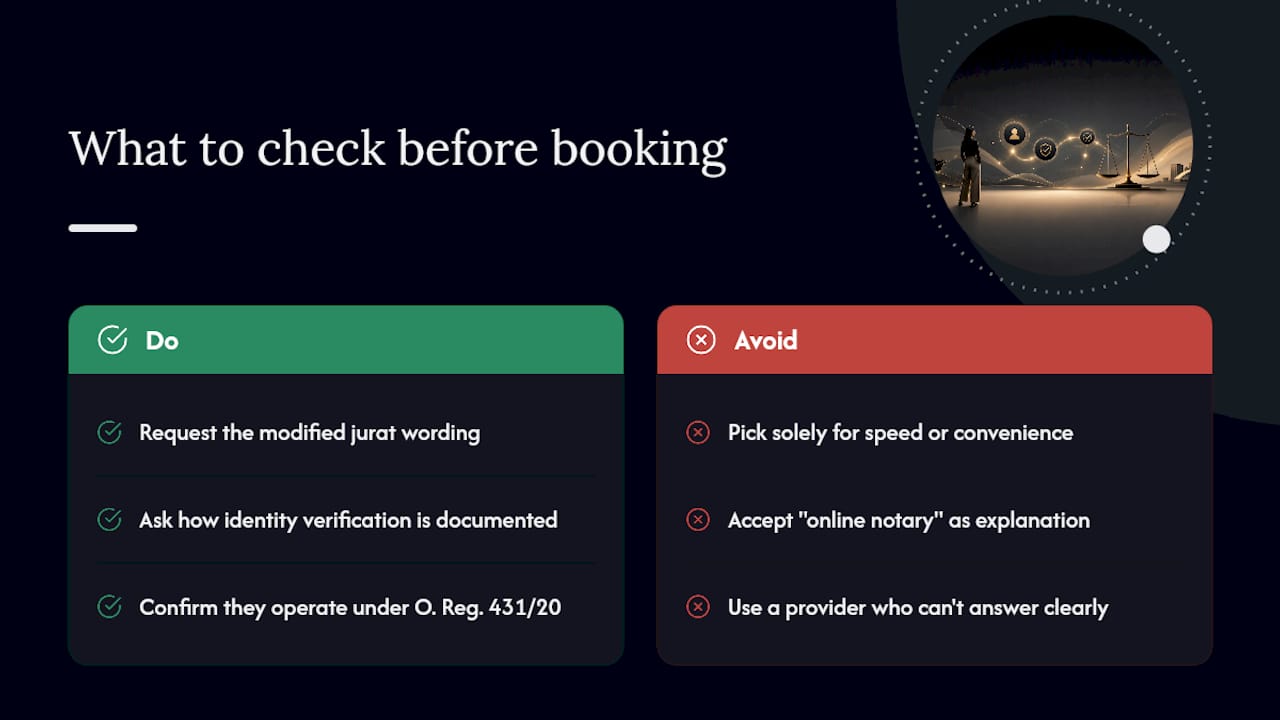
Where I think most guidance falls short is in treating "online notary" and "remote commissioning" as interchangeable marketing terms. They're not, and the Law Society's own notice on this makes clear that conflating them can produce an invalid document. If a provider can't tell you, specifically, whether they're operating under O. Reg. 431/20 or something else entirely, that's a real gap in how they're representing their service to you.
My advice: before you book anything, ask to see the modified jurat wording and ask how identity verification gets documented. A commissioner who answers both questions without hesitation is one who understands the regulation. One who can't is a risk you don't need to take on a document that might end up in front of a judge.
— Ken
Book a Compliant Remote Commissioning With Theonlinenotary
If you need an affidavit, statutory declaration, or solemn declaration commissioned without driving across town or taking time off work, Theonlinenotary handles the entire process online, built around the identity checks and modified jurat wording this article just walked through.

Individuals and businesses across Ontario use the service for exactly the situations covered here: court filings, immigration paperwork, property transactions, and government submissions that require a properly commissioned document. Theonlinenotary also handles remote witnessing of wills and powers of attorney, plus in-person notary services for certified true copies in Brampton for anyone who needs a document that specifically requires a notarial act rather than commissioning.
Pricing runs per document with clear costs for additional pages, so there's no guessing what an appointment will cost before you book. If you're ready to move forward, visit the notary online Ontario services page to see appointment availability and what to have ready before your session.
Where to Verify These Rules Yourself
For readers who want to check the source rules directly rather than take any provider's word for it, these are the primary references:
- Remote Commissioning guidance from the Law Society of Ontario, including the Notice to the Professions on online notary services.
- Ontario Regulation 431/20, which sets the legal conditions for administering an oath or declaration remotely.
- The Ministry's Guide for newly appointed commissioners for taking affidavits in Ontario, which includes sample jurat wording and practical guidance.
Sources
- Remote Commissioning - Law Society of Ontario
- Notice to the Professions: Online notary services are not permitted under the Notaries Act - Law Society of Ontario
- Guide for newly appointed commissioners for taking affidavits in Ontario - Government of Ontario