

Yes, remote commissioning is legal in Ontario. O. Reg. 431/20 permits a commissioner to administer an oath or declaration over live video, provided the session uses real-time audio-visual technology, the commissioner verifies the deponent's identity, the jurat is modified to state both parties' locations, and the commissioner confirms the deponent understands the document. Miss any one of those four elements and the document is vulnerable to challenge.
TL;DR:
- Remote commissioning in Ontario is only valid if the session occurs in real-time with audio-visual interaction, verified identity, a modified jurat including locations, and confirmation of understanding.
- The process must involve direct, live communication and identity checks with government-issued ID, not recorded videos or asynchronous methods.
- Commissioners, lawyers, and paralegals can perform remote affidavits, but notaries typically require original documents and in-person handling for certification or authentication tasks.
- Proper record-keeping of verification methods, session details, and parties’ locations is crucial to defend the document against future challenges.
- Theonlinenotary offers compliant remote commissioning services for $49.99 CAD per document, with a prepared checklist to ensure adherence to Ontario's legal requirements.
Table of Contents
- What Online Commissioning Rules in Ontario Actually Cover
- The Four Legal Requirements Under O. Reg. 431/20
- Who Can Commission a Document Remotely in Ontario
- How to Run a Compliant Remote Commissioning Session
- Where Remote Commissioning Goes Wrong
- Record-Keeping That Actually Holds Up
- When Remote Commissioning Makes Sense, and When It Doesn't
- Book a Compliant Remote Commissioning Session
- Sources
- FAQ
What Online Commissioning Rules in Ontario Actually Cover
Remote commissioning lets a commissioner for taking affidavits swear or affirm a document with someone who isn't physically in the room, using a live video connection instead of a shared table. The Ontario digital commissioning requirements grew out of pandemic-era necessity but were made a standing part of the Commissioners for Taking Affidavits Act framework through O. Reg. 431/20.
Not every document benefits from this route, and not every task falls inside it. Typical candidates include:
- Affidavits used in court filings, real estate, or immigration matters
- Statutory declarations for government or institutional purposes
- Solemn declarations where no oath is required but a signed attestation is
Remote commissioning is not remote notarization of a physical original. If an institution needs a notary's seal on a physical document, or wants to verify an original against its copy, that usually still calls for in-person notarization rather than a video call.
The Four Legal Requirements Under O. Reg. 431/20
Ontario's online certification rules boil down to four non-negotiable elements, and every one of them has to be met, not just most.
- Real-time audio-visual communication. The commissioner and deponent must see, hear, and speak with each other live for the entire swearing. A recorded video, a voicemail confirmation, or a "watch this clip and sign" workaround does not qualify. The regulation's real-time language rules out any asynchronous method, no matter how convincing the file looks afterward.
- Identity verification. The commissioner has to confirm who they're dealing with, typically by having the deponent hold up government-issued photo ID to the camera and comparing it against the person on screen. Note in your file what document you checked and how the comparison went.
- A modified jurat with locations. The jurat, the block of text just above the signature line, must say the oath or declaration was administered remotely and state where the commissioner and the deponent each were located at the time. Leaving out the location detail is one of the most common ways a remotely commissioned document gets flagged later.
- Confirmation of understanding. The commissioner needs to take an active step, usually a verbal exchange on camera, to make sure the deponent understands what they're swearing to and is doing so freely.
Pro Tip: Read the modified jurat language out loud on the call before anyone signs. It forces both parties to confirm the wording matches what actually happened, which catches location or date mistakes before they become a signed error.
Who Can Commission a Document Remotely in Ontario
Commissioners for taking affidavits, lawyers, and paralegals licensed in Ontario can all administer oaths and declarations remotely under the regulation, and the same professional obligations that apply in person apply on camera. A commissioner still has to satisfy themselves the deponent is competent, unpressured, and clear on what they're signing. Skipping that judgment call because the meeting happened over video is not a defense if the document is later challenged.
Notaries public occupy different territory. Their core function often involves certifying that a copy matches an original or authenticating a document for use abroad, tasks that generally require physically handling the paper. That's why:
- A commissioner swears or affirms an affidavit or declaration, in person or remotely under O. Reg. 431/20.
- A notary public frequently needs the original document in hand, particularly for certified true copies or international authentication.
- When a receiving institution specifically demands a wet-ink original or a notarial certificate on the paper itself, in-person service is the safer, sometimes only, option.
How to Run a Compliant Remote Commissioning Session
Getting the online commissioning application process right comes down to preparation more than technology. Here's the order that works:
- Confirm the platform and connection before booking. Use a stable video service with two-way audio and video, not a chat app or a one-way recording tool. Test your camera, lighting, and internet connection ahead of time so the actual session isn't derailed by a frozen screen.
- Gather the right identity documents. A driver's license or passport works best. Have it ready to hold up to the camera, not just described verbally.
- Let the commissioner verify your ID on camera. They'll ask you to show the document clearly, compare the photo to your face, and may ask a few confirming questions.
- Review and sign during the live call. The commissioner administers the oath or declaration, walks through the modified jurat, and watches you sign, all in real time.
- Handle originals separately if an institution requires them. Some receiving parties still want a physical copy mailed or dropped off afterward, so ask before the appointment.
- Keep a transaction log. Note the date, platform used, identity document checked, and both parties' locations. Retain it for as long as you'd keep any other legal record tied to that document.
Pro Tip: If you're commissioning for a business, keep a standing template for your transaction log so every session gets the same fields recorded automatically. It saves time and closes the gap where details get forgotten under deadline pressure.
Where Remote Commissioning Goes Wrong
Most compliance failures aren't dramatic. They're small omissions that only surface when someone challenges the document months later.
- The jurat never got updated to mention the remote administration or the locations of the parties.
- Identity was "confirmed" verbally instead of shown on camera and compared.
- Someone used a pre-recorded video clip instead of a genuinely live session.
- Nobody wrote down where the commissioner or deponent actually were during the call.
- The commissioner didn't note whether the deponent seemed to understand the document or was signing under pressure.
The fix for all five is procedural, not technical. Follow the Law Society of Ontario's remote commissioning checklist, verify identity live rather than by assertion, and use a platform built for two-way video rather than a workaround. On duress and understanding specifically, a brief written note in your log ("deponent confirmed understanding, no signs of pressure") is often the only evidence you'll have if the transaction is questioned later.
Record-Keeping That Actually Holds Up
The Law Society's guidance is blunt on this point: the regulation makes remote commissioning possible, but the paper trail is what makes it defensible. A solid record includes:
- The method used to verify identity, and which document was checked
- The video platform used for the session
- The stated locations of both the commissioner and the deponent
- A copy of the modified jurat as signed
- Any notes on the deponent's apparent understanding of the document
Keeping a detailed record of how identity was confirmed during the video session isn't optional paperwork. It's the difference between a document that survives scrutiny and one that doesn't.
At Theonlinenotary, every remote session generates an audit trail that captures these exact details as the transaction happens rather than reconstructing them from memory afterward. That habit of documenting as you go, not after the fact, is the single biggest predictor of whether a remotely commissioned document holds up later.
When Remote Commissioning Makes Sense, and When It Doesn't
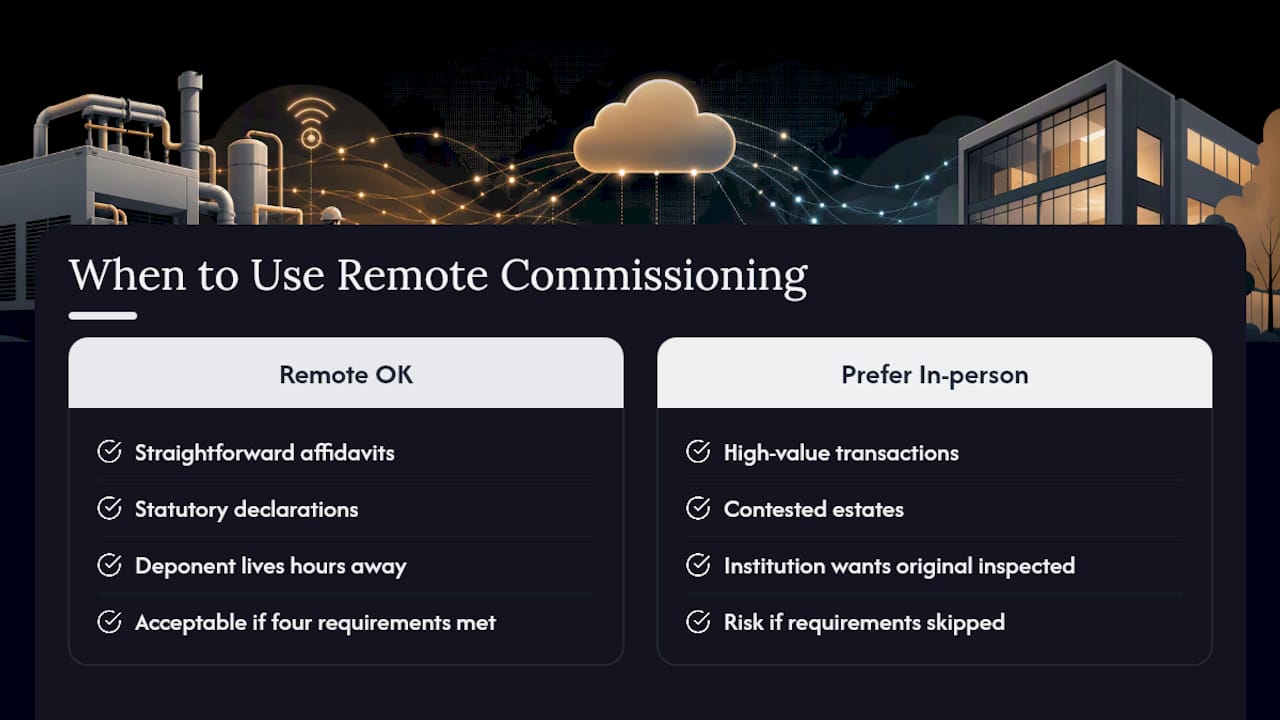
Remote commissioning earns its place for straightforward affidavits, statutory declarations, and situations where the deponent lives hours from the nearest commissioner. It's a genuine access improvement, not a compromise.
Where I'd push back toward in-person handling: anything involving high-value transactions, contested estates, or documents where an institution explicitly wants to inspect an original. Courts and regulators in Ontario have accepted the remote model without controversy so far, but that acceptance rests entirely on commissioners following the four requirements to the letter. Skip a step to save five minutes, and you've handed a challenger their opening.
— Ken
Book a Compliant Remote Commissioning Session
If you'd rather not build a compliance checklist from scratch, Theonlinenotary handles the entire process for you, already built around O. Reg. 431/20's four requirements, with an audit trail generated for every session instead of a scramble to reconstruct one later.

Theonlinenotary offers online commissioning services for individuals and businesses at $49.99 CAD per document (plus $20 CAD per additional page for individuals, $40 CAD for businesses), covering affidavits, statutory declarations, and solemn declarations for Ontario residents and businesses. Wills and powers of attorney can also be witnessed remotely, and the services page lists pricing for each. Before your appointment, a quick read of the preparation guide will save you time on the call itself. Ready to get a document commissioned properly the first time? Book your session directly through Theonlinenotary and have your affidavit or declaration handled in one sitting.
Sources
- O. Reg. 431/20: Administering Oath or Declaration Remotely | Government of Ontario
- Remote commissioning | Law Society of Ontario
This article is general information, not a substitute for advice from a qualified lawyer. Consult a qualified legal professional about your own circumstances before acting on anything here.
FAQ
Is remote commissioning legal in Ontario?
Yes. O. Reg. 431/20 permits it as long as the session uses real-time audio-visual technology, verifies identity, includes a modified jurat stating both parties' locations, and confirms the deponent understands the document.
Can documents be commissioned virtually in Ontario?
Affidavits, statutory declarations, and solemn declarations can be commissioned virtually under the same regulation. Documents requiring examination of a physical original, such as certified true copies, generally still need in-person handling.
Who can commission a document in Ontario?
Commissioners for taking affidavits, lawyers, and paralegals licensed in Ontario can all administer oaths and declarations, whether in person or remotely under O. Reg. 431/20. Each carries the same professional duty to confirm the deponent's understanding and freedom from pressure.
Is remote notarization legal in Ontario?
Remote commissioning of oaths and declarations is legal, but it's distinct from notarizing an original physical document, which usually still requires in-person handling. Services like Theonlinenotary offer both remote commissioning and in-person notary services in Brampton depending on which one your situation calls for.
What does online commissioning cost through Theonlinenotary?
Online commissioning services for individuals and businesses are priced at $49.99 CAD per document, with additional pages billed separately, as listed on Theonlinenotary's site.