

Yes, remote commissioning of affidavits and statutory declarations is legal in Ontario, provided the session satisfies Ontario Regulation 431/20. That means a live two-way audiovisual connection, verified identity, a modified jurat naming both physical locations, and a retained record of the transaction. Acts requiring a seal or certified true copy, like true copy certifications, still need an in-person notary.
TL;DR:
- Remote commissioning in Ontario is only valid if the session involves a real-time audiovisual connection, verified identity, and a record of the process, with some acts still requiring in-person notarization.
- The modified jurat must explicitly state the remote nature of the oath and include both locations, as failure to do so can lead to rejection by courts or authorities.
- Identity verification requires clear, close-up ID photos, live confirmation of full names and dates of birth, and watching for signs of coaching or poor video quality.
- Technical setup must encompass stable video, session recording, encryption, and proper document handling, with practice beforehand essential to avoid disruptions.
- Most rejection issues stem from missing or vague jurat wording, inadequate identity proof, or recipient policies that restrict accepting remotely commissioned documents.
Table of Contents
- What Remote Commissioning Covers in Ontario
- Who Can Legally Commission Remotely?
- Which Ontario Laws Govern Remote Commissioning?
- The Five Legal Conditions for a Valid Remote Session
- Building the Right Technical Setup
- Why the Jurat Wording Determines Whether Your Document Holds Up
- How Do You Verify Identity Remotely?
- What Records Should You Keep, and for How Long?
- Why Recipients Reject Remotely Commissioned Documents
- A Practical Workflow for a Reliable Remote Session
- A Publisher's Note on What Actually Makes Remote Commissioning Work
- Book a Compliant Remote Commissioning Session With Theonlinenotary
- Where to Verify These Rules Yourself
- Sources
What Remote Commissioning Covers in Ontario
Remote commissioning lets a commissioner administer an oath, affirmation, or statutory declaration over live video instead of sitting across a desk from the person signing. It covers the documents most Ontario residents and businesses actually need commissioned day to day.
- Affidavits for court proceedings, immigration applications, and name changes
- Statutory declarations for employment, insurance, or estate matters
- Oaths and affirmations tied to sworn statements
Remote commissioning is not the same as remote notarization. A notary public's seal, and certified true copies of original documents, generally still require physical presence because the notary must physically inspect and stamp the original. If your document needs a raised or embossed seal rather than a sworn signature, the remote setup discussed here won't apply, and you'll want in-person notarization instead.
Who Can Legally Commission Remotely?
The Commissioners for Taking Affidavits Act sets out who holds commissioning authority in Ontario: lawyers, paralegals, and individually appointed commissioners, each operating under a specific appointment or professional license. Not every appointment carries the same scope. Some commissioners are restricted to a particular employer, government office, or type of document, so check the notice of appointment before assuming authority extends to remote sessions.
Commissioners and notaries public are often confused, but they're not interchangeable. A commissioner administers oaths and takes affidavits. A notary certifies copies and authenticates documents for use abroad. Knowing which one you actually need saves a wasted appointment.
Which Ontario Laws Govern Remote Commissioning?
Four sources control this area, and reading them in order actually makes the rules click:
- The Commissioners for Taking Affidavits Act is the base statute that creates commissioning authority in Ontario.
- O. Reg. 431/20, made under that Act, is the regulation that specifically permits remote administration of oaths when its conditions are met.
- The Law Society of Ontario's remote commissioning guidance translates the regulation into a working checklist for lawyers and paralegals.
- The Guide for newly appointed commissioners for taking affidavits in Ontario, published by the province, includes the Ministry's sample jurat wording.
These are the primary sources. Blog posts and templates drift out of date; the statute and regulation don't. Check them directly before relying on any secondhand summary, including this one.
The Five Legal Conditions for a Valid Remote Session
The Law Society distills O. Reg. 431/20 into five conditions. Miss one, and the document is vulnerable to rejection.
- See, hear, and communicate in real time. A phone call with no video doesn't qualify. You need a live audiovisual connection stable enough to see facial expressions and hear clearly, for the full session.
- Confirm identity. The commissioner verifies the deponent's identity using government-issued photo ID, displayed on camera, before administering the oath.
- Use a modified jurat. The signed jurat must state the oath was administered remotely and list the physical location of both the commissioner and the deponent.
- Ensure understanding. The commissioner confirms the person understands what they're swearing to and is doing so voluntarily, not under pressure from someone off camera.
- Maintain a transaction record. A record of the session, and often a recording, gets retained after the appointment closes.
Pro Tip: Law Society guidance is explicit that substance beats technical box checking. A crystal clear video connection paired with a genuine identity check matters far more than a fancy platform with a shaky verification process.
Building the Right Technical Setup
Your platform needs three things at minimum: real time audio and video, session recording, and encryption strong enough to protect a legal document in transit. Test these before your first live appointment, not during it, because a frozen screen mid oath is how sessions fall apart.
On the hardware side, position your camera so it can capture a clear, close-up shot of a photo ID, not just a face. Use a wired connection or a strong secondary hotspot as backup, and check your lighting so shadows don't obscure a signature or ID photo. A cheap ring light solves more commissioning problems than people expect.
For document handling, screen-sharing the document as the deponent signs a physical copy works better than relying on a scanned signature alone. Ask the deponent to hold the signed original up to the camera afterward as a tamper-evidence step.
- Record every session in a standard, widely readable video format
- Store recordings on an access-controlled, encrypted drive, not a personal laptop
- Log who accessed each recording and when
Pro Tip: Run through the full workflow in a sandbox session with a colleague before touching a live client file. Providers who rehearse the Ontario remote commissioning process end up catching platform quirks that would otherwise surface in front of a paying client.
Why the Jurat Wording Determines Whether Your Document Holds Up
The jurat is the clause below the signature confirming how and where the oath was taken. For a remote session, it must say the oath was administered remotely under O. Reg. 431/20 and state the physical location of both the commissioner and the deponent at the time.
Leave out the location language, and the document risks outright rejection by the receiving court, government office, or institution. This is the single most common drafting mistake in remote commissioning, and it's entirely avoidable. Use the sample jurat wording published in the Ministry's guide for newly appointed commissioners rather than improvising your own phrasing. Practitioners report that disputes over remote commissioning most often come down to whether the location statement was specific enough, so name a municipality or province, not a vague "remote location."
How Do You Verify Identity Remotely?
Identity verification is where most remote sessions succeed or fail. The commissioner should ask for a government-issued photo ID (a driver's license or passport) held close enough to the camera to read clearly, then cross-check the name and photo against a second document if anything looks off.
- Ask the deponent to state their full legal name and date of birth aloud
- Compare the ID photo to the live video feed, checking for consistency
- Request a corroborating document if the primary ID is worn, expired, or hard to read on screen
Watch for red flags that should pause or stop the session entirely: video quality too poor to actually verify an ID, answers that contradict the document being signed, or any sign that someone off camera is coaching or pressuring the deponent. The Law Society's guidance treats a genuine identity check as more important than any single piece of technology, and that priority should guide every judgment call during the session.
What Records Should You Keep, and for How Long?
At minimum, retain the session recording, a log of the ID documents reviewed, a signed copy of the jurat, and timestamped notes on when the oath was administered. Store all of it on encrypted, access-controlled storage rather than a shared drive or personal device.
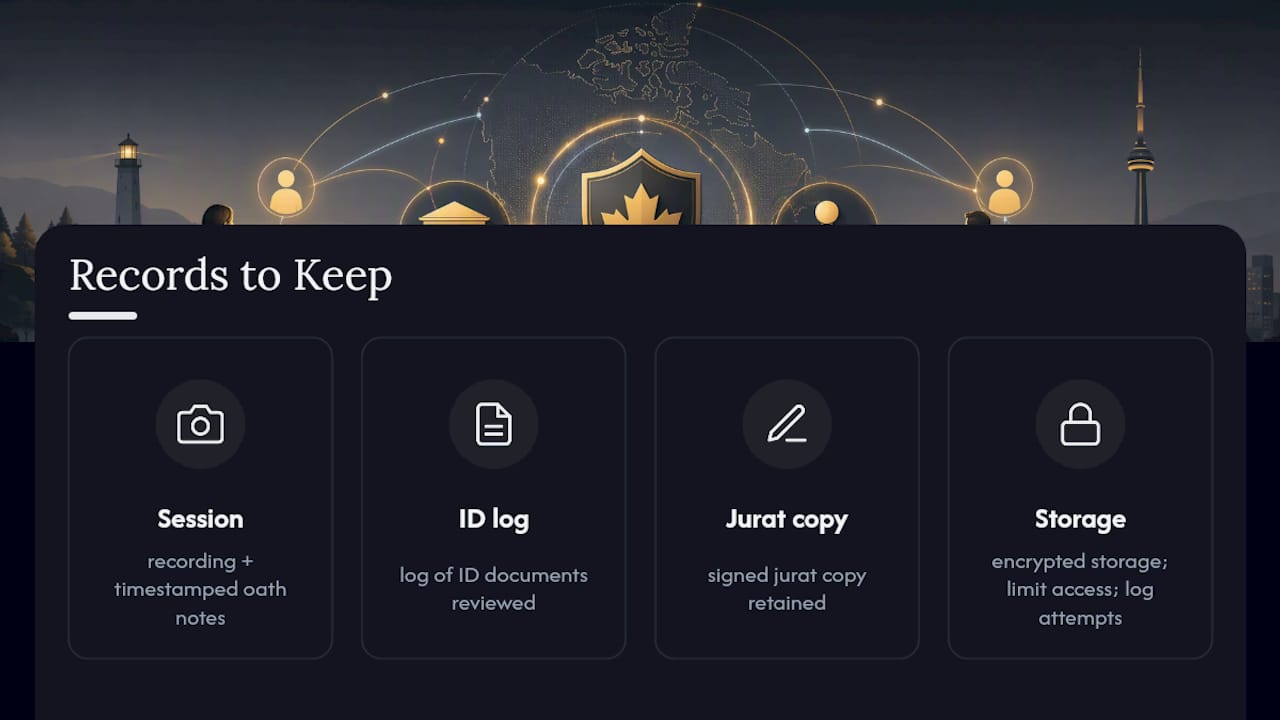
A multi-year retention period is a common practice among Ontario commissioners, though the exact duration depends on the document type and your own risk tolerance. Limit who can access stored recordings, log every access attempt, and never email a recording or ID copy as an unprotected attachment. Canadian privacy expectations around personal information make this a baseline, not an extra precaution, and secure handling practices apply just as much to a stored video file as to the paper document itself.
Why Recipients Reject Remotely Commissioned Documents
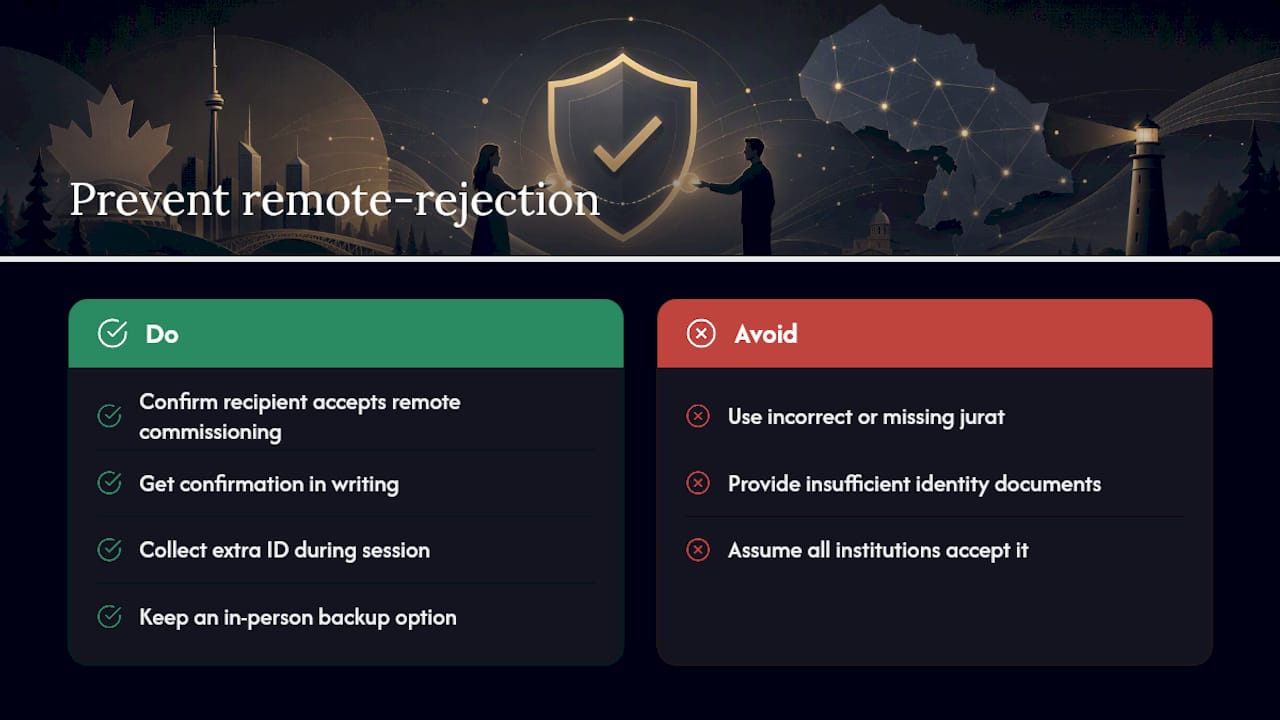
The most frequent rejection reasons are an incorrect or missing jurat, insufficient identity documentation, or a receiving institution's own internal policy against remote commissioning altogether. Courts, government offices, and financial institutions don't all follow the same acceptance rules.
Before booking a remote session, call or email the recipient and ask directly whether they accept remotely commissioned documents and whether they require any specific jurat language. Get that confirmation in writing when you can. As a backup plan, collect an extra piece of ID during the session and keep a certified in-person option in reserve for any recipient that turns out to be inflexible. The Law Society notes that recipient policies, not the regulation itself, are usually the reason a valid document still gets bounced back.
A Practical Workflow for a Reliable Remote Session
Running a remote commissioning appointment smoothly comes down to sequence. Skip a step early, and you'll be redoing the whole thing later.
- Before the session: confirm the recipient accepts remote commissioning, test your platform and camera setup, send the deponent instructions on lighting and ID requirements, and have the document ready to share on screen.
- During the session: verify identity on camera, administer the oath or declaration, complete the modified jurat with both physical locations, record timestamps, watch the signing happen live, and log everything as you go.
- After the session: secure the recording and ID log in encrypted storage, arrange for return of any physical original if the recipient requires it, and send written confirmation to the client that the document is complete.
A Publisher's Note on What Actually Makes Remote Commissioning Work
Ontario's rules aren't complicated once you've run through them a few times, but they punish sloppiness in a way in-person commissioning never did. A shaky video connection or a jurat missing a location line doesn't just look unprofessional. It can void the document. Theonlinenotary builds every session around the Law Society checklist and the Ministry's own wording, because that's the only version of "fast and remote" worth offering.
— Ken
Book a Compliant Remote Commissioning Session With Theonlinenotary
Running the technical setup above correctly, every single time, takes practice most individuals and small businesses don't have the bandwidth for. Some online notary services handle the entire workflow for you: identity verification against government ID, the modified jurat with both locations recorded correctly, encrypted session recording, secure storage, and return of your original document if one's required.

Before booking, have your government ID ready, know which document you need commissioned, and check with the recipient about any specific requirements they have. Theonlinenotary's online notary and commissioning services cover affidavits, statutory declarations, and invitation letters for individuals and businesses across Ontario, with set pricing per document so there's no guessing at cost before you book. If you're not sure which document type applies to your situation, the guide to affidavit types in Ontario is worth a read first. When you're ready, book your session and get it done without leaving your desk.
Where to Verify These Rules Yourself
For the actual legal text and official wording, go directly to the primary sources: the Commissioners for Taking Affidavits Act, the consolidated regulation text on CanLII, the Law Society's remote commissioning guidance, and the Ministry's guide for newly appointed commissioners. These sources govern compliance, and they get updated when the rules change.
This article is general information, not a substitute for advice from a qualified lawyer. Consult a qualified legal professional about your own circumstances before acting on anything here.
Sources
- Remote commissioning - Law Society of Ontario
- Guide for newly appointed commissioners for taking affidavits in Ontario
- Commissioners for Taking Affidavits Act (Ontario)
- Ontario Remote Online Notary Complete Walkthrough - NotaryCentral
- Consolidated regulation references - CanLII