
Remote witnessing is legal in Ontario for wills and powers of attorney under Bill 245, but online notarization remains off-limits under the Notaries Act. What separates a valid remote signing from an invalid one usually comes down to the paperwork: a modified jurat noting each party's location and method, a transaction record, identity checks logged at the time, and proof that signatures happened contemporaneously or through matching counterpart copies.
TL;DR:
- Remote witnessing of wills and powers of attorney is legal in Ontario if all documentation and identity verification procedures are properly followed during live video sessions.
- Licensees, such as lawyers or paralegals, must be one of the witnesses and confirm identity through real-time audiovisual checks, including government-issued ID verification.
- Record-keeping requires a modified jurat specifying remote signing, locations involved, and a transaction record, all stored securely for potential future challenges.
- Online notarization is not recognized under Ontario law, and attempting to do so puts the validity of documents at risk; only remote witnessing and commissioning are permitted within existing regulations.
- Failing to log identity verification, use standard in-person procedures, or treat counterparty signing casually can invalidate a remote witnessing record or lead to document challenge.
Table of Contents
- What Do Remote Witnessing Records in Ontario Actually Cover?
- Who Can Witness Remotely and How Is Identity Verified?
- Which Ontario Laws Actually Govern These Records?
- How Do You Build a Defensible Remote Witnessing Record?
- What Mistakes Actually Invalidate a Remote Witnessing Record?
- How Does a Practitioner Actually Document a Remote Session?
- Book a Compliant Remote Witnessing Session
- Where to Verify These Rules Yourself
- Sources
- FAQ
What Do Remote Witnessing Records in Ontario Actually Cover?
Three terms get used interchangeably in Ontario, and mixing them up causes real legal trouble. Remote witnessing lets a witness observe a signature by video instead of standing in the same room. Remote commissioning lets a commissioner administer an oath or take a declaration over video call. Online notarization, where someone claims to notarize a document entirely through a remote platform, is a different animal, and it isn't recognized under Ontario's Notaries Act. The Law Society of Ontario has warned that notaries cannot exercise notary powers remotely, and any service claiming otherwise puts the resulting document at risk of being challenged or thrown out entirely.
Wills and powers of attorney sit at the center of what's actually allowed. Under Bill 245, the Accelerating Access to Justice Act, remote execution and witnessing of these two document types became permanent, not a pandemic-era workaround. That permission comes with strings attached: a licensee often has to be one of the witnesses, and the signing has to follow specific counterpart or contemporaneous rules.
What falls outside this permission matters just as much:
- General notarial acts requiring in-person presence for identity confirmation in the traditional sense
- Any document type not covered by O. Reg. 164/20 or the will/POA provisions in Bill 245
- Acts that a service provider labels "online notarization" without regulatory backing
If you're unsure whether your document qualifies, our guide to what a notary actually does in Ontario breaks down the distinction between notary powers and commissioner functions.
Who Can Witness Remotely and How Is Identity Verified?
A licensee, meaning a lawyer or paralegal licensed by the Law Society, typically needs to be one of the witnesses when a will or power of attorney is signed remotely. This isn't optional in most cases; it's the safeguard that makes the remote process defensible if the document is ever contested.
Identity verification under O. Reg. 431/20 requires more than glancing at a driver's license through a webcam. The regulation calls for:
- Real-time audiovisual communication where the commissioner can actually see and hear the deponent, not a recorded video
- Confirmed government-issued identification, checked against the person present on screen
- A secondary verification step when anything about the identification looks inconsistent
Capacity, duress, and undue influence deserve extra attention on video, where subtle cues are harder to catch than in person. The Law Society advises that licensees stay especially vigilant about these risks in remote sessions and document exactly what steps they took to confirm the person understood what they were signing.
Pro Tip: If anything about the session feels off, whether it's a hesitant answer, a muted microphone at a key moment, or someone off-camera prompting responses, write it down immediately in your transaction log. A vague memory six months later won't hold up; a timestamped note will.
Which Ontario Laws Actually Govern These Records?
Four regulatory pieces control what a valid remote witnessing or commissioning record has to look like, and each one plays a different role.
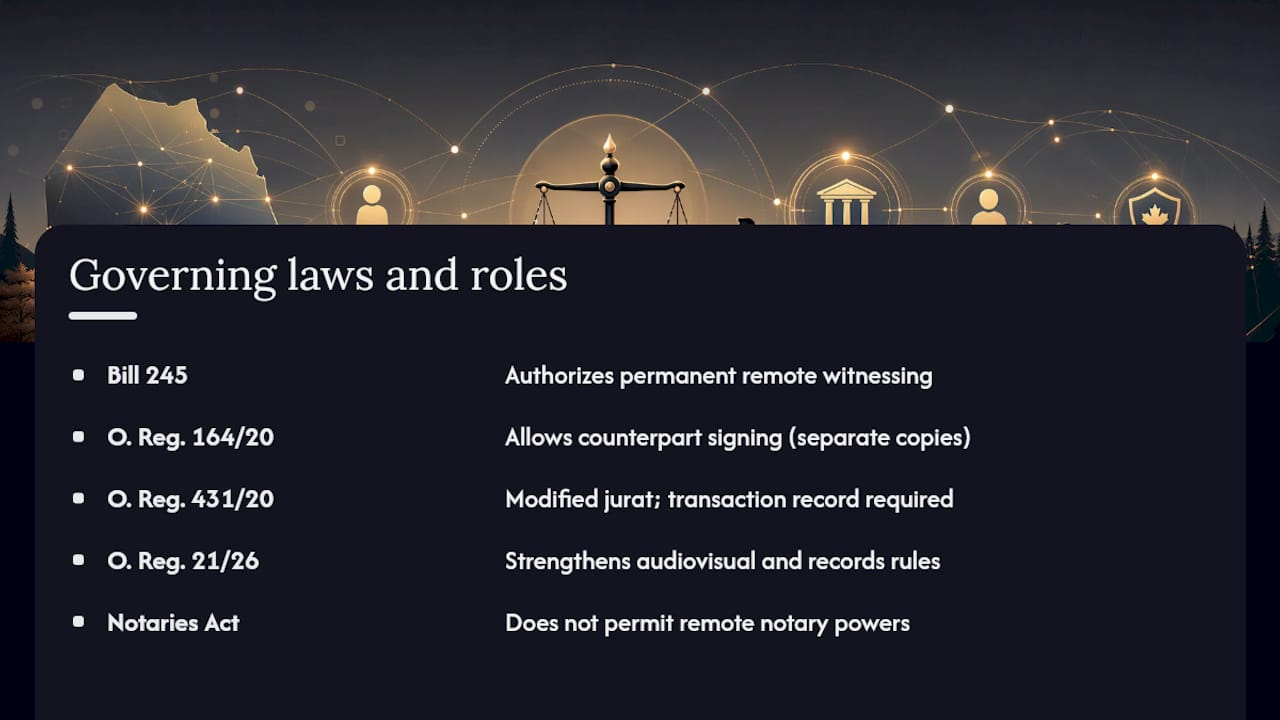
Bill 245 amended the Succession Law Reform Act and the Substitute Decisions Act to authorize remote witnessing of wills and powers of attorney on a permanent basis, not as a temporary emergency measure.
O. Reg. 164/20 governs the mechanics of remote will and POA signing. It permits counterpart copies, meaning the testator and witnesses can sign separate but identical copies of the same document, as long as the signing happens contemporaneously and the copies match exactly. The Law Society's FAQ on remote execution confirms this counterpart approach is valid, not a gray area.
O. Reg. 431/20 is the record-keeping backbone for remote commissioning. It requires a modified jurat, one that explicitly states the oath or declaration was taken remotely and lists the physical locations of everyone involved, plus a kept record of the transaction itself.
O. Reg. 21/26, which took effect in 2026, amended O. Reg. 431/20 to sharpen the audiovisual and record-keeping requirements, reinforcing that the transaction record isn't a nice-to-have; it's baked into the regulation.
None of this touches the core restriction: the Notaries Act still doesn't permit notaries to exercise their powers remotely, a line the Law Society reiterates because so many online services blur it. For more on where these lines fall, see our breakdown of online notary options and their legal realities in Ontario.
How Do You Build a Defensible Remote Witnessing Record?
A defensible record isn't something you assemble after the fact. It gets built in three phases, starting before anyone signs anything.
- Before the session: Confirm which government-issued IDs you'll check and how. Test the audiovisual platform in advance. Tell everyone involved, in writing if possible, whether they'll be signing contemporaneously or using counterpart copies, and what that means practically.
- During the session: Note the platform used, the date and time, and each participant's physical location as they state it on camera. Watch for anything suggesting confusion, pressure, or hesitation, and write it down as it happens, not from memory afterward. If counterpart copies are being used, confirm out loud that both documents are identical before anyone signs.
- Immediately after: Draft the modified jurat. There's no standardized template for this, so licensees have to adapt language that clearly states the act was performed remotely and lists the locations involved. Collect original signed pages if the process requires them.
- Retention: Keep the signed original (or both counterparts), a PDF scan, and a written transaction log noting IDs checked, platform used, and any capacity or identity observations. Most practitioners retain these records for at least as long as the underlying document could be challenged, which for wills and POAs often means years, not months. If a video recording was made and it's lawful to keep it, store it with the rest of the file.
Pro Tip: Keep your transaction log as a short, separate document rather than burying the details in your general file notes. When a document gets challenged years later, you want that record easy to pull, not scattered across emails and calendar entries.
The Ontario Bar Association's guidance on remote execution echoes this: preserving evidence of the session matters as much as the signing itself.
What Mistakes Actually Invalidate a Remote Witnessing Record?
The most common failure point isn't a bad-faith attempt to cut corners. It's a rushed session where nobody writes anything down until it's too late to remember the details accurately.
- Assuming a general "online notary" service can legally notarize a document remotely, when the Notaries Act simply doesn't allow it
- Skipping the modified jurat, or using a standard in-person jurat that never mentions the session was remote
- Failing to log identity checks in real time, leaving no record of what ID was shown or how it was confirmed
- Treating counterpart signing as casual, without confirming the copies are identical or that signing happened at the same time
- Ignoring signs of confusion or pressure because the session felt routine
If any of these show up mid session, the right move is to pause. A licensee who suspects the person doesn't fully understand what they're signing, or senses someone else influencing the process off camera, should stop and either reschedule for an in-person meeting or decline to proceed. That decision, documented in the transaction log, protects everyone involved far more than pushing through an uncertain signing ever would. For a closer look at where these risks concentrate, our article on notarizing multiple documents online covers similar red flags in bulk-signing scenarios.
How Does a Practitioner Actually Document a Remote Session?
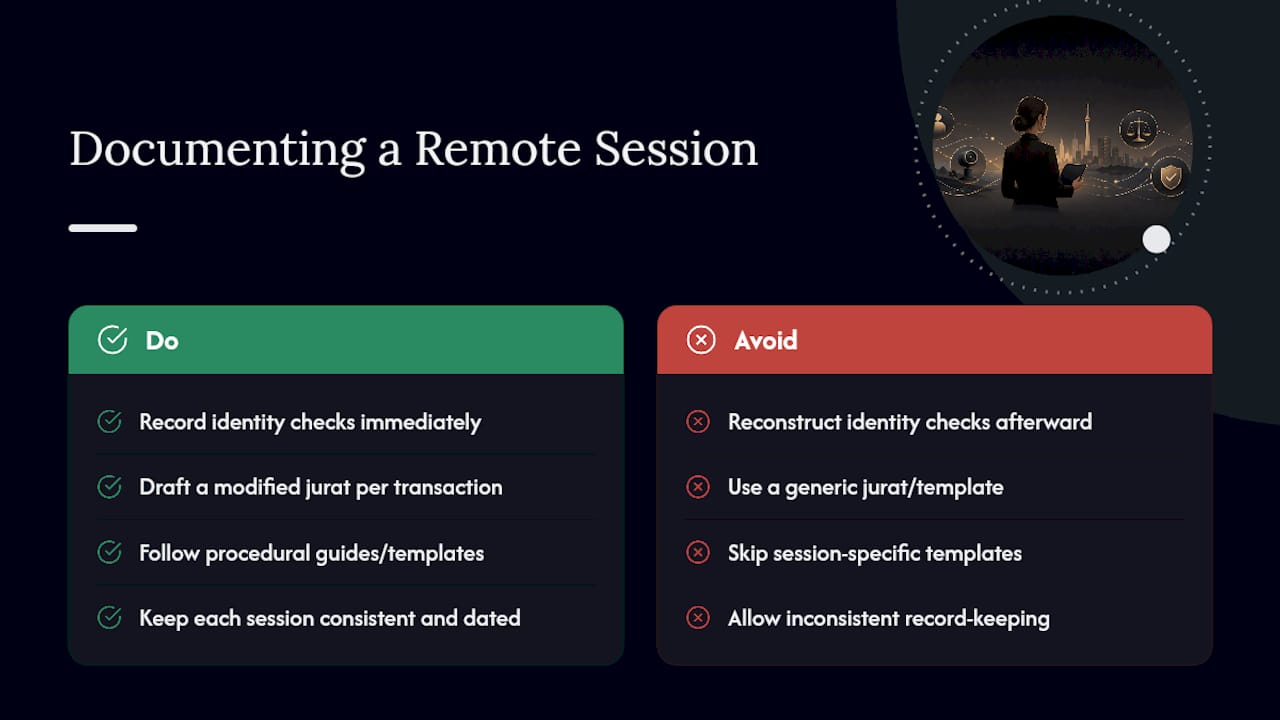
Every remote session handles logging the same way: identity checks recorded at the moment they happen, not reconstructed afterward, and a modified jurat drafted specifically for that transaction rather than pulled from a generic template. That consistency is what makes a record hold up if it's ever questioned months or years later.
Procedural guides walk through the steps followed for each session type, designed to mirror what regulators actually expect to see in a transaction record. If you're preparing for your own remote signing, this online notary guide for Ontario lays out the process in more detail, including templates designed to keep every session consistent.
— Ken
Book a Compliant Remote Witnessing Session
Remote commissioning and witnessing services are available for affidavits, statutory declarations, invitation letters, and powers of attorney for people across Ontario who'd rather not take time off work or drive across town for a signature. Every session includes identity verification, a properly drafted modified jurat, and a transaction log kept on file, the exact records this article walks through.

A typical session takes place over video call, taking a short amount of time: you show your ID, confirm your location, and sign while we document each step as it happens. No guesswork about whether the paperwork will hold up later. If you need a statutory declaration or affidavit commissioned this week, book a session through our services page and get a compliant, properly logged record without leaving your home or office.
Where to Verify These Rules Yourself
For anyone who wants to check the regulatory language directly rather than take a summary at face value, these are the primary sources this article draws from:
- Law Society of Ontario notice on online notary services
- O. Reg. 431/20 on remote commissioning and its 2026 amendment, O. Reg. 21/26
- Law Society FAQ on remote execution of wills and powers of attorney, covering O. Reg. 164/20
- Bill 245, the Accelerating Access to Justice Act, on Ontario's e-Laws site
This article is general information, not a substitute for advice from a qualified lawyer. Consult a qualified legal professional about your own circumstances before acting on anything here.
Sources
- Notice to the Professions: Online notary services are not permitted under the Notaries Act | Law Society of Ontario
- O. Reg. 431/20: Administering oath or declaration remotely
- O. Reg. 21/26: Administering oath or declaration remotely (amendment)
FAQ
Can You Witness a Document Virtually in Ontario?
Yes, but only for specific document types. Wills and powers of attorney can be witnessed virtually under Bill 245 and O. Reg. 164/20, provided the session follows contemporaneous signing or counterpart rules.
Is Virtual Witnessing of Wills Legal in Ontario?
Yes. Bill 245 made remote execution and witnessing of wills permanent in Ontario, as long as a licensee is typically involved as one of the witnesses and the signing follows regulatory requirements.
Who Can Witness a Legal Document in Ontario?
For remote wills and powers of attorney, a licensee, meaning a lawyer or paralegal, generally needs to be one of the witnesses. For other documents, witness eligibility depends on the specific act and regulation involved.
Can a Family Member Witness a Legal Document?
Generally, no, particularly for wills and powers of attorney, since a family member who could benefit from the document creates a conflict of interest that undermines the document's validity. Independent, disinterested witnesses are the standard practitioners follow.
What Records Does Remote Commissioning Require in Ontario?
O. Reg. 431/20 requires real time audiovisual communication, confirmed identity checks, a modified jurat listing each party's location, and a kept record of the transaction itself.