
Yes, Ontario allows remote witnessing of wills and powers of attorney, but only under three strict conditions: at least one witness must be a Law Society of Ontario licensee, all parties must sign contemporaneously during a live audio-visual session, and signing happens in counterpart using wet-ink copies. If you're planning a remote signing, read the step-by-step breakdown below before you book anyone.
TL;DR:
- Remote witnessing of wills and powers of attorney in Ontario requires at least one licensee, with all parties signing simultaneously during a live video session.
- Signatures must be on identical wet-ink paper copies signed in counterpart; electronic signatures alone are not legally sufficient.
- Witnesses cannot be beneficiaries, their spouses, or individuals with a conflict of interest, and must verify signers' identities on camera.
- A licensee witness, such as a lawyer or paralegal, is essential; non-licensed individuals cannot serve as witnesses in remote executions.
- Remote witnessing is ideal for straightforward cases, but in situations involving capacity issues, conflicts, or technological barriers, in-person signing remains the safer option.
Table of Contents
- Remote Witnessing Rules in Ontario: The Legal Basis
- Who Can Witness a Document Remotely in Ontario
- How a Compliant Remote Witnessing Session Actually Works
- What Lawyers Watch for During Remote Sessions
- When In-Person Signing Is the Safer Choice
- Access Matters, but So Does Judgment
- Book a Compliant Remote Witnessing or Commissioning Session
- Where to Verify These Rules Yourself
- Sources
- FAQ
Remote Witnessing Rules in Ontario: The Legal Basis
Ontario's remote witnessing framework traces back to Bill 245, the Accelerating Access to Justice Act, which received Royal Assent on April 19, 2021. The bill amended the Succession Law Reform Act and the Substitute Decisions Act, taking a pandemic-era emergency measure and turning it into permanent law. That matters because it means remote witnessing isn't a temporary workaround anymore. It's a standing legal option, as durable as in-person signing.
The actual mechanics live in O. Reg. 129/20, which permits wills and powers of attorney to be signed through audio-visual communication technology, provided a licensee witness participates and everyone signs identical copies in counterpart. The regulation even allows for minor, non-substantive differences between those copies (a slightly different margin, a page that printed a touch darker), as long as the documents are otherwise the same instrument.
A separate rule, O. Reg. 431/20, governs a different process entirely: administering oaths and declarations remotely. This covers affidavits and statutory declarations, not wills or powers of attorney. Mixing up commissioning and witnessing is one of the most common compliance errors people make, since the two tracks have different identity checks, different documentation, and different legal effects.
One rule cuts across both: electronic signatures are not a substitute for wet ink on a will or power of attorney. You can sign while connected over video, but you still need a pen and a printed page.
- Bill 245 made remote execution permanent, not just a pandemic exception.
- O. Reg. 129/20 governs wills and POAs; it requires a licensee witness and counterpart signing.
- O. Reg. 431/20 governs remote commissioning of oaths and declarations, a separate legal track.
- E-signatures alone will not validate a will or POA in Ontario.
Neither regulation prescribes a single required software platform or script. They set conditions, not a checklist of approved apps, which is why the practical safeguards in the sections below matter as much as the statutes themselves.
Who Can Witness a Document Remotely in Ontario
At least one witness has to be a licensee under the Law Society Act at the moment of signing, meaning a lawyer or a licensed paralegal in good standing. This is the single condition where there's no flexibility. If neither witness holds a current license, the remote execution route simply isn't available to you, no matter how well the video call went.
Lawyers and paralegals aren't interchangeable here. A lawyer can draft the will, advise on its contents, and witness the signing. A paralegal can serve as the licensee witness but cannot draft a will or give legal advice on its terms. Know which service you actually need before you book.
Some people are barred from witnessing regardless of their license status:
- Beneficiaries named in the document, or their spouses.
- Anyone with a financial or personal conflict of interest in the outcome.
- Anyone unable to confirm the signer's identity on camera.
Identity verification typically means showing a government-issued photo ID directly to the camera, matching the name spoken aloud to the name on the document, and recording the session details, including date, time, and who was present. A licensee who skips this step is taking on real liability.
How a Compliant Remote Witnessing Session Actually Works
- Prepare identical paper copies. Every signer and witness needs their own printed, page-matched copy of the will or POA before the call starts.
- Test the technology in advance. Confirm your camera, microphone, and internet connection work, and pick a platform that lets everyone stay visible for the full session.
- Confirm the licensee's status and screen for conflicts. The lawyer or paralegal witness should verify their own license is active and confirm no one on the call is a beneficiary.
- Verify identity on camera. Each signer holds up government ID; names and locations are stated out loud and recorded.
- Sign in counterpart while connected live. The testator or donor signs their copy, then each witness signs their own copy of the same document, without disconnecting the call.
- Witnesses sign contemporaneously. No one signs after the call ends. The signing has to happen while everyone is still watching in real time.
- Collect and reconcile all counterparts. Gather every signed copy afterward and check that only minor, non-substantive differences exist between them, as O. Reg. 129/20 allows.
- Keep a record. Retain notes on who attended, what ID was shown, and when signing occurred, in case the document's validity is ever questioned.
Pro Tip: Frame your camera so both your hands and the document are visible while you sign. A witness who can't actually see the pen touch the page has a much harder time swearing that the signing happened the way the law requires.
If the technology fails partway through, stop. Reschedule rather than trying to patch together a signing that was partially remote and partially not. Ontario's rules assume one continuous live session, not a hybrid.
What Lawyers Watch for During Remote Sessions
Capacity and undue influence are harder to judge through a screen than across a table. A witness can't see who else might be in the room, and a signer who seems hesitant on video could be nervous, confused, or being coached by someone off-camera. The Law Society of Ontario has flagged this as a real limitation, not a hypothetical one, and expects practitioners to screen for it case by case.
Warning signs worth pausing for: someone else's voice prompting answers from off-screen, a signer who can't explain the document's basic terms in their own words, or inconsistent answers about who is present in the room. Forged ID and altered counterpart pages are the other major risk, which is why secondary identity checks and careful recordkeeping matter as much as the video call itself.
Pro Tip: If anything about a remote session feels off, a licensee is within their rights to pause, ask for the room to be shown on camera, or simply decline to proceed until an in-person signing can be arranged.
When In-Person Signing Is the Safer Choice
Remote witnessing isn't the right fit for every situation. Capacity concerns, a contested estate where challenges are likely, or genuine language and technology barriers all point toward an in-person signing instead.
- Doubts about mental capacity or signs of undue influence.
- Estates already showing signs of family conflict or likely litigation.
- Signers who struggle with the video technology or the language used in the session.
- Situations where a licensee simply can't get a clear view of the room.
If concerns surface mid-session, the right move is to stop and reschedule in person rather than push through. For affidavits and statutory declarations specifically, remote commissioning under O. Reg. 431/20 remains a separate, often simpler, option.
Access Matters, but So Does Judgment
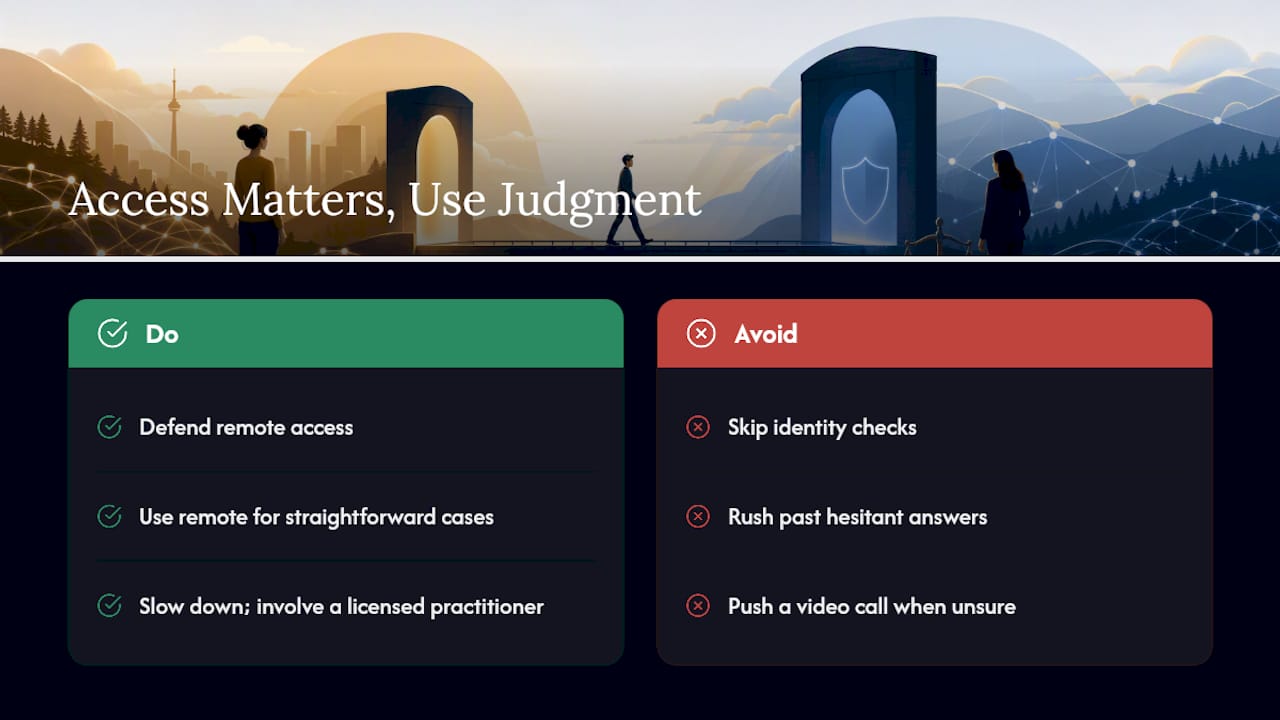
Remote witnessing opened up a real option for people who can't easily get to a law office: someone recovering from surgery, a parent juggling childcare, a family member signing from another city. That access is worth defending.
But the safeguards aren't paperwork for its own sake. A licensee who skips identity checks or rushes past a hesitant answer isn't saving anyone time, they're building a document that could unravel later. When a case looks straightforward, remote works well. When something feels off, the right answer is almost always to slow down and involve a licensed practitioner directly, not to push a video call to its limit.
— Ken
Book a Compliant Remote Witnessing or Commissioning Session
Remote witnessing services can help with two common challenges in Ontario: finding a licensee witness on short notice and ensuring identity verification and recordkeeping are completed correctly. Instead of tracking down a lawyer's office schedule or guessing whether your setup meets the counterpart rule, you book a session, prepare your copies using the guidance provided, and complete the signing over live video with a licensed witness confirming your identity and documenting the process.

The service covers remote witnessing for wills and powers of attorney under O. Reg. 129/20, plus remote commissioning for affidavits and statutory declarations under O. Reg. 431/20, so you're not stuck figuring out which track your document actually needs. Everything from pre-session prep to post-signing document handling happens with a licensed practitioner walking you through it. If you're ready to move forward, book a remote notary appointment and get a specific time on the calendar instead of hoping your DIY video call holds up.
Where to Verify These Rules Yourself
- Law Society of Ontario FAQ: the licensing body's own guidance on remote execution.
- O. Reg. 129/20 and O. Reg. 431/20: the actual statutory text on Ontario.ca.
- Ontario Bar Association tips: practical compliance guidance written for practicing lawyers.
Sources
- FAQs about remotely executing wills and powers of attorney - Law Society of Ontario
- Ontario
- Ontario
- Tips for remote execution - Ontario Bar Association
FAQ
Is virtual witnessing of wills legal in Ontario?
Yes. It's been permanently legal since Bill 245 amended the Succession Law Reform Act in 2021, provided a licensee witness participates, signing is contemporaneous over live video, and parties sign identical wet-ink copies in counterpart.
Can you witness a document virtually in Ontario?
It depends on the document. Wills and powers of attorney can be witnessed virtually under O. Reg. 129/20, while affidavits and statutory declarations follow the separate remote commissioning process under O. Reg. 431/20.
Who can witness a document in Ontario?
For remote execution of a will or POA, at least one witness must be a licensed lawyer or paralegal with the Law Society of Ontario; beneficiaries and anyone with a conflict of interest cannot serve as a witness.
What are the legal requirements for electronic signatures in Ontario?
For wills and powers of attorney, electronic signatures alone are not sufficient; the law requires wet-ink signatures on identical paper copies signed in counterpart, even when the parties connect through live video. Other document types have different rules, so check the specific requirement before assuming an e-signature will work.
Can I use a service like Theonlinenotary for remote witnessing?
Yes. Theonlinenotary provides remote witnessing for wills and powers of attorney, along with remote commissioning for affidavits and statutory declarations, handling identity verification and recordkeeping as part of the booking process.